
- User interface
- Research
- Windows client
Filter: Drill-down and Roll-up Analysis for Patents
More flexibility in patent searches: Switch between current and previous filter settings with a single click.
Release date
July 30, 2026
Version
26.7.3
Feature type
New Function
Type of User
Advanced User, Light User
Use filter settings even more conveniently now
With the latest update, working with filters in IP7 Compass has become much more flexible. You can now easily navigate between your most recently used filter settings—similar to using the forward and back buttons in a web browser.
After applying a filter, the new results list opens as usual. What’s new, however, is that you can use the arrow keys at any time to return to a previous filter setting or move forward to the next one. This allows you to quickly compare different filter combinations without having to reset all the criteria.
Example:
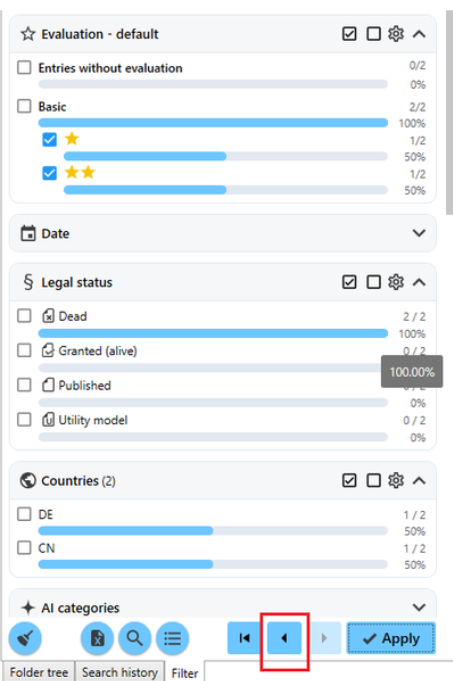
Previous Setting:
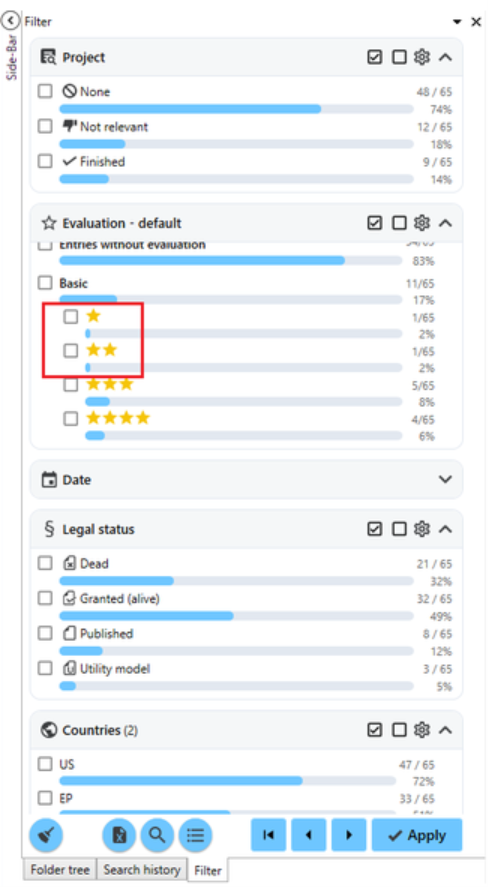
You can clear the filter selection using the broom icon on the left. If you want to return to the unfiltered results, use the "Start" button on the navigation bar:

Your Benefits at a Glance:
– Quickly switch between different filter settings
– Do not recreate filters that have already been used
– Easily compare different lists of results
– More efficient work when conducting extensive patent searches
This new navigation feature saves valuable time, especially when dealing with complex search queries, and makes working with filters much more convenient.